
Choosing the right design tool today depends on your workflow, skill level, and creative needs. Two of the most widely used tools are Adobe Photoshop and Canva.
While both are powerful, they serve very different purposes. Photoshop is a professional-grade editing software, whereas Canva is a beginner-friendly design platform focused on speed and simplicity.
In this detailed comparison, we’ll explore features, usability, pricing, and real-world applications to help you choose the right tool.
Adobe Photoshop vs Canva: Quick Overview
| Feature | Adobe Photoshop | Canva | Winner |
|---|---|---|---|
| Primary Use | Advanced editing & design | Quick graphic design | Depends |
| Best For | Professionals, designers | Beginners, marketers | Canva |
| Learning Curve | Steep | Very Easy | Canva |
Key Insight:
Photoshop is built for full creative control, while Canva is designed for fast and easy design creation.
Features Comparison
| Feature | Photoshop | Canva | Winner |
|---|---|---|---|
| Editing Tools | Advanced & unlimited | Basic editing | Photoshop |
| Templates | Not included | Thousands available | Canva |
| AI Tools | Generative AI, advanced tools | AI design tools | Depends |
| Layer System | Advanced | Basic | Photoshop |
| Design Assets | Limited built-in | Massive library | Canva |
Analysis
Photoshop offers deep editing capabilities, including retouching, compositing, and advanced manipulation.
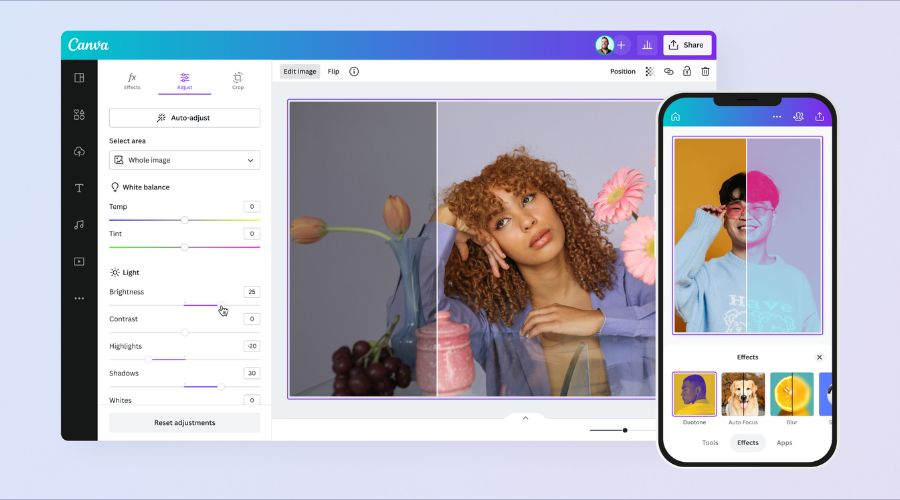
Canva focuses on ease and speed, offering templates, drag-and-drop tools, and built-in assets.
Winner: Depends on your needs
Ease of Use: Which Is More Beginner-Friendly?
| Factor | Photoshop | Canva | Winner |
|---|---|---|---|
| Interface | Complex | Clean & simple | Canva |
| Learning Curve | High | Very Low | Canva |
| Workflow Simplicity | Medium | Very High | Canva |
Analysis
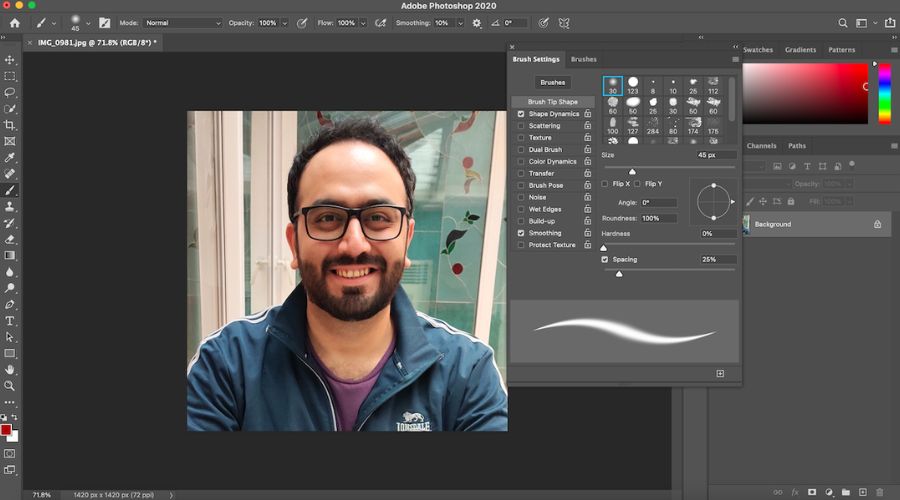
Photoshop requires understanding of layers, masks, and professional tools, which can take time to learn.
Canva is designed for non-designers, making it accessible to anyone instantly.
Winner: Canva
Performance & Workflow Efficiency
| Factor | Photoshop | Canva | Winner |
|---|---|---|---|
| Speed | Resource-heavy | Fast (cloud-based) | Canva |
| Batch Editing | Moderate | Limited | Photoshop |
| Collaboration | Limited | Strong | Canva |
Analysis
Photoshop performs best for detailed, high-resolution projects, but it can be resource-intensive.
Canva excels in quick design workflows and team collaboration, especially for marketing teams.
👉 Winner: Canva (for speed & collaboration)
Image Quality & Creative Control
| Feature | Photoshop | Canva | Winner |
|---|---|---|---|
| Image Quality | Professional-grade | Basic | Photoshop |
| Editing Precision | Extremely high | Limited | Photoshop |
| Creative Freedom | Unlimited | Restricted | Photoshop |
Analysis
Photoshop is the industry standard for image editing and creative design.
Canva is more suitable for simple visuals and web graphics, not high-end editing.
Winner: Photoshop
Pricing Comparison
| Factor | Photoshop | Canva | Winner |
|---|---|---|---|
| Pricing Model | Subscription | Freemium + Subscription | Canva |
| Free Version | No | Yes | Canva |
| Cost | Higher | Affordable | Canva |
Analysis
Photoshop starts around $20+ per month, while Canva offers a free plan and lower-cost premium plans.
Winner: Canva
Real-World Use Cases
| Use Case | Best Choice | Reason |
|---|---|---|
| Social Media Design | Canva | Ready templates |
| Photo Retouching | Photoshop | Advanced tools |
| Marketing Creatives | Canva | Fast workflow |
| Graphic Design | Photoshop | Full control |
| Team Collaboration | Canva | Real-time sharing |
Pros and Cons
| Category | Adobe Photoshop | Canva |
|---|---|---|
| Pros | • Industry-standard software • Advanced editing tools • Unlimited creativity • High-quality output |
• Easy to use • Free version available • Thousands of templates • Fast design creation |
| Cons | • Steep learning curve • Expensive • Requires powerful system |
• Limited editing features • Not suitable for professionals • Less control |
Final Winner Breakdown
| Category | Winner |
|---|---|
| Overall Flexibility | Photoshop |
| Ease of Use | Canva |
| Features | Photoshop |
| Performance | Canva |
| Pricing | Canva |
Final Verdict: Which One Should You Choose?
Choosing between Adobe Photoshop and Canva depends entirely on your goals.
Choose Photoshop if:
- You need professional-level editing
- You work on complex designs or photo manipulation
- You want full creative control
Choose Canva if:
- You create social media content
- You want quick and easy designs
- You are a beginner or marketer
Conclusion
When comparing Adobe Photoshop and Canva, the decision ultimately comes down to your purpose, skill level, and workflow needs.
If you are someone who values creative freedom, precision, and professional-quality output, Photoshop is undeniably the better choice. It gives you complete control over every pixel, making it ideal for designers, photographers, and advanced users who demand perfection.
However, if your priority is speed, simplicity, and efficiency, Canva stands out as the more practical tool. It removes complexity and allows anyone—regardless of experience—to create visually appealing designs quickly.